.png?height=120&name=logo_blue%20(1).png)
The aim of our CSM department is to stay close to our customers to manage health, maximise upselling and control churn.
Monthly to do for Customer Success
1) Update customer health status property and log the relevant meeting (as CSM Health check), use the relevant snippet points.
a) Use the relevant snippet points (type #yellow, #red, #green and press enter to insert the snippet with the relevant questions)
b) Ad participants and outcome to meeting
2) Update transaction forecasting for the following month.
To log a meeting
Go on the customer in Hubspot, under the "Meetings" tab click "Log meeting". under "Type" select "CSM health check". Add attendes and outcome etc. In the description field type # + the relevant health colour to insert the relevant snippet text for the meeting (Red, Green, Yellow).
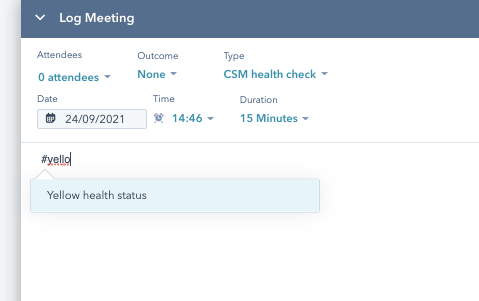
Add the relevant notes to the questions as you speak to the client.
Once everything is filled in correctly, click "log activity".

It is recommended to cover the forecasting on the same round with the client to get the fullest picture possible of the client's predicted spend.
In the conversation with the client we need to understand their setup and understand where any additional EasyTranslate products would make sense for the client in terms additional languages and/or Machine Translation etc.
Kick-off meeting
When hosting the kick-off meetings with new clients, please use this meeting type. "Log meeting" and select "CSM kick-off meeting" under type.
Platform training
When hosting meetings with client users to demonstrate the platform, log this as meeting type "CSM platform training".